.: Assalamualaikum....Selamat Datang :. Firdaus@NetSec

Monday, February 7, 2011

Spoofing

  • is a common phishing tactic.
  • is the creation of TCP/IP packets using somebody else's IP address. Routers use the "destination IP" address in order to forward packets through the Internet, but ignore the "source IP" address.
EXAMPLES OF SPOOFING
  1. Caller ID spoofing
  2. Email spoofing
  3. Man - in - the - midle
  4. Routing redirect 
  5. Source routing
  6. Blind spoofing
  7. Flooding
1.  CALLER ID SPOOFING 
  • the act of using a spoof card or other tool to call someone's phone under a false name.
2. EMAIL SPOOFING 
  • a technique used by hackers to fraudulently send email messages in which the sender address and other parts of the email header are altered to appear as though the email originated from a source other than its actual source.
  • Example :-
  1. E-mail "from" the American Red Cross following the September 11 disaster sent recipients to fake Web sites where people used credit cards to make "donations".
  2. Messages appearing to come from companies such as Warner Bros and Computerworld included links to porn sites.
  3. A recent virus program sent e-mail that appeared to come from Microsoft, and even used the company logo and other graphics. Links on the e-mail went to the actual Microsoft site, however the message urged you to install a Microsoft security update which was included as an attachment. Of course the attachment was really a virus.
     
WHO IS SPOOFING  ?
  • Spam
  • Viruses
  • Fraud
  • Trouble Maker
FIRST STEP IN SPOOFING
  • Determining the IP address of a host the intended target trust.
  • the attaker can change the headers of packets to make it seem like the transmissions are originating from yhe trusted machine.
PREVENTION OF CALLER ID SPOOFING
  • block spoofing calls
  • password protect your voicemail
  • avoid revealing sensitive information, such as your credit card or bank account number, via phone

PREVENTION OF EMAIL SPOOFING
  • Safeguard your email address and avoid disclosing it.
  • Distinguish real emails from spoofed ones.
  • Examine the email's language, tone and appearance, and note if it is different than usual.
  • Do not diclose personal information. 
  • Report suspicious emails to the company being spoofed. 
Jenis - jenis serangan yang lain diterangkan dengan detail oleh Faiz...
Sila lihat  KaSipeCaH
     

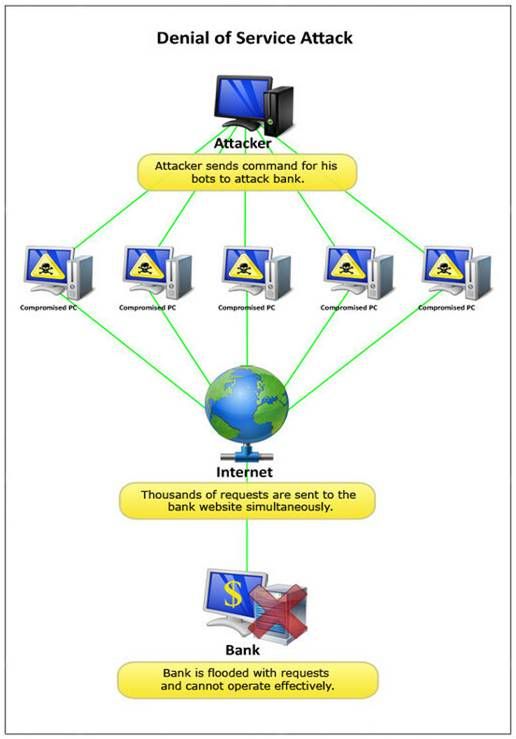
    How to Prevent DoS & DDoS

    There are plenty of ways to prevent, stop, fight and kill off DDoS attack, such as using firewall. A low cost, and probably free method is by using software based firewall or filtering service. (D)DoS-Deflate is a free open source Unix/Linux script by MediaLayer that automatically mitigate (D)DoS attacks. It claims to be the best, free, open source solution to protect servers against some of the most excruciating DDoS attacks.

    DDoS - Distributed Denial of Services

    • DDos merupakan serangan secara besar-besaran, terarah kepada perkhidmatan internet dan sumber yang tersedia.
    • Ia secara tidak langsung melancarkan serangan DoS melalui komputer yang dijangkitinya. (dikenali sebagai 'secondary victims')
    • Serangan DDoS biasanya lebih tertumpu untuk menyerang laman web syarikat korporat.
    • DDoS terdiri daripada master, slave, dan victims dimana master adalah penyerang, slave adalah sistem yang dijangkiti dan victim sudah tentunya ialah mangsa penyerang

    DOS - Denial of Service

    • Serangan ini bertujuan untuk mencegah pengguna yang sah mengakses perkhidmatan yg disediakan.
    • Serangan ini tidak ditujukan kepada kumpulan.
    • Serangan DoS biasanya menggunakan perisian pepijat ( software bug ) untuk menghancurkan atau membekukan servis atau network resource, atau bandwidth limit dengan teknik "flood attack" untuk menyemakkan bandwith
    • DOS menyerang melalui teknik "traffic flooding", "request flooding", dan pengubahan maklumat host.

     .

    Tuesday, February 1, 2011

    Ceaser Cipher

     
    Ceaser cipher menggunakan formula tersendiri untuk menge’shift’kan susunan normal abjad rumi menjadi susunan yang baru yang tidak diketahui kecuali pencipta formula.
    Contoh diatas menunjukkan ‘shift’ abjad bermula pada abjad ‘X’ dan seterusnya.
    Contoh ayat :-  J O M   P   P A S A R   M A L A M
    Cipher text   :-  M R P   S  S D U D U   P D O D P

    Monday, January 31, 2011

    Encryption

    Tujuan – untuk menghalang pengguna yang tidak disahkan ( unauthorized user ) untuk membaca mesej peribadi.

    Kaedah – mengubah perkataan plaintext menggunakan key @ cipher yang dikenali sebagai cipher text.


    Terdapat pelbagai cara / kaedah untuk melakukan encryption seperti:

    • PGP – pretty good privacy
    • MD5 HASH
    • 3DES / DES
    • CEASER CIPHER 

    Hash - hashing ialah transformasi  satu turutan aksara kepada nilai yang lebih pendek daripada nilai asal.
               Contohnya, perkataan 'firdaus' tidak disimpan sebagai "firdaus" di dalam database. Ia telah ditransfom menjadi nilai yang lebih pendek seperti "6678". Ini memudahkan proses pencarian dalam database.


      Type of encryption –

      • Symmetric
        • Mempunyai 1 public key.
        • Public key digunakan oleh kedua – dua sender dan receiver untuk encrypt dan decrypt data.
        • Teknik ini lebih pantas berbanding kaedah asymmetric encryption.
        • Kelemahan teknik ini ialah apabila key yang digunakan diketahui oleh orang lain, data tidak selamat.


      • Asymmetric
        • Mempunyai 2 key iaitu public dan private key.
        • Public key digunakan untuk sender encrypt data.
        • Private key digunakan oleh receiver untuk decrypt data semula.
        • Kebaikan kaedah ini ialah user yang tidak mempunyai private key tidak boleh decrypt data.
        • Kelemahan teknik ini pula ialah proses encrypt dan decrypt lebih mengambil masa.

      Thursday, January 20, 2011

      Remote Control

      • Remote PC merupakan satu kaedah untuk mengawal komputer lain.
      • iannya bermaksud seperti komputer A mengawal komputer B.
      • Host perlu mencipta satu password dan admin perlu mengetahui password itu untuk connect pc A ke pc B.
      • Admin juga perlu mengetahui IP address pc host.
      • Apabila admin ingin mengawal pc host. admin perlu masukkan IP address dan connect.
      • Jika IP address yg admin masukkan salah, admin tidak akan dapat mengawal pc host.
      • Jika betul, admin akan diminta memasukkan password yg host telah tetapkan dan dapat mengawal pc host.
      • Apabila sudah connect antara 2 pc, admin boleh memilih untuk view sahaja pc host ataupun ingin mengawal pc host.
      • ia juga membolehkan kita utk :-
      • 1. chat 
        2. transfer data
        3. sharring data dll